If you no longer wish to receive marketing emails from Gardening Direct, you can unsubscribe at any time — it’s quick and easy.
Unsubscribe via email
Each promotional email we send includes an "Unsubscribe" link at the bottom. Simply:
- Scroll to the bottom of the email
- Click “Unsubscribe”
- Follow the steps on screen to confirm your preferences
Please note it may take a few days for your request to fully process.
Update preferences via your account
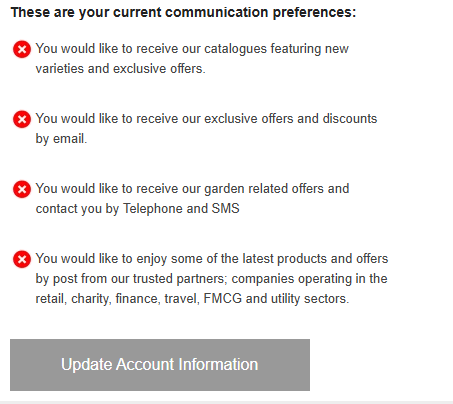
You can also log in to your online account and update the marketing preferences.
- Log in to your account on our website
- Head to the Account Information tab [located on the left]
- Scroll down towards the bottom
- Select 'Update account information'
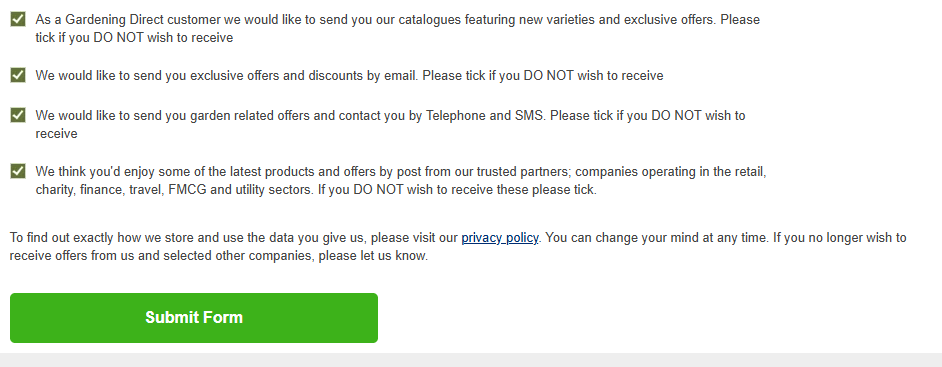
- Go through the checklist and select/de-select the options as per your preferences
- Click 'Submit Form' to save the changes
Need help?
If you're still receiving emails after unsubscribing, or you're not still unsure how to unsubscribe, please Send us a Message and we’ll be happy to assist you.
Was this article helpful?
That’s Great!
Thank you for your feedback
Sorry! We couldn't be helpful
Thank you for your feedback
Feedback sent
We appreciate your effort and will try to fix the article