Got a gift or discount voucher? Here’s how to apply it - and what to do if it doesn’t look like it’s worked.
My gift/discount/postage voucher code isn’t working
- Use the correct box: Please enter your code in the GIFT CARDS box (not the OFFER CODE box). On mobile, you may need to scroll further to find it.
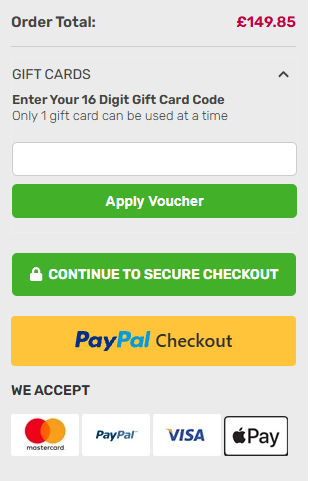
- Enter it exactly as written: Codes are case-sensitive - watch for look-alike characters (O/0, I/1) and avoid extra spaces before/after the code.
- Spacing: Please ensure there are no spaces before or after the code
My voucher hasn’t been deducted on my confirmation
- Don’t worry - vouchers act as part-payment. They’re deducted before your payment method is charged, so the confirmation may not show a separate discount line.
- Quick check: Compare your original order total minus the voucher value with the amount you paid - they should match.
If you have checked everything and believe the voucher amount is not being deducted then there may be an issue with the voucher itself.
Please Send us a Message and we’ll sort it out.
Was this article helpful?
That’s Great!
Thank you for your feedback
Sorry! We couldn't be helpful
Thank you for your feedback
Feedback sent
We appreciate your effort and will try to fix the article